


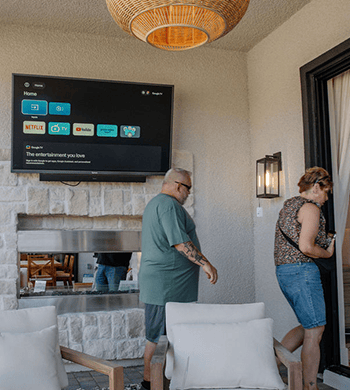

For a patio or covered deck, plan the screen position, nearby equipment, power outlet, cable route, and service access in that order. This gives the installer a clear view of what is permanent, what remains reachable, and what depends on the selected television. The Sylvox outdoor TV installation guide covers the broader installation process. For a Sylvox outdoor TV, the best time to resolve these questions is before the bracket, wall finish, or trim hides the path.
Map the TV, equipment, and power outlets together
Start with the actual viewing location, not the nearest existing receptacle. Mark the screen center, the outside edges of the housing, the bracket position, and any nearby equipment. Then mark where power is available and where a cable may need to pass through a wall, post, beam, cabinet, or weather-exposed area.
| Item to mark | Why it matters before installation |
|---|---|
TV position and housing outline | Establishes where the cable entry and service opening can be located |
Source equipment | Shows which connections need to reach the screen and which can stay elsewhere |
Power outlet | Separates an existing suitable outlet from work that may require an electrician |
Wall, post, beam, or cabinet boundaries | Identifies obstacles and the structure that the route must cross |
Access for future service | Prevents the television or trim from becoming a permanent barrier |
Include doors, windows, posts, lighting, speakers, and furniture in the sketch. Photograph the area from the front and behind the wall when possible. This gives the installer a clear view of the screen, equipment, power outlet, and route.
Decide what must be permanent before the mount goes up
Separate decisions about power from decisions about low-voltage connections. A new circuit, a change to an outdoor receptacle, or work that passes through the building envelope is not the same task as choosing where an HDMI or other signal cable should enter. Local requirements and site conditions determine the right method, so have a qualified electrician assess electrical changes before installing the mount. The CPSC home electrical safety checklist treats outdoor receptacles and ground-fault protection as safety matters. Use it to frame questions for a professional, not as a universal wiring prescription; an extension cord, indoor outlet, or cover may not meet site requirements. Write down the questions that need a professional answer:
- Is the existing power outlet suitable for the planned location and environment?
- Will the route require a new circuit, a new box, or a change to the building surface?
- Which parts of the route must remain accessible for inspection or replacement?
- What local requirements apply to the outdoor power arrangement?
This gives the homeowner a list of questions to prepare while the electrician or installer determines how the electrical work should be carried out.
Trace the cable path with service access in mind
Draw the route as a sequence rather than a single line from the source to the television. Note the entry point, changes in direction, exposed sections, connection points, and where excess cable will be managed. If the screen is on an adjustable mount, include the movement range in the drawing. A cable that reaches a fixed screen may become tight when the screen swivels or tilts. Keep the path protected from the conditions it will actually face. Sun, rain, condensation, wind movement, sharp edges, and repeated motion all change how route should be assessed. Avoid burying a connection behind a sealed panel simply because it makes the finished wall look clean. Leave a deliberate service point where you can inspect or replace a cable, source device, or television. Make two versions of the plan if both temporary and permanent routing options are available. Label the route that will be hidden before installation and the route that must remain visible or reachable. That small distinction can prevent an installer from closing the wrong access point.
Plan connections for the exact television
For a Sylvox outdoor TV, check the product page and manual for the model you plan to install. Confirm the port layout, connector direction, cable length, and rear clearance before closing the route.For network, casting, and audio choices, use the outdoor TV connectivity and audio planning guide. If casting becomes unstable, first review what to check before rewiring before changing the cable route. Before the installation appointment, record:
- The exact television model number and region.
- The location and direction of each connection that will be used.
- The distance from the connection point to the equipment or route entry.
- Whether the mount, housing, or wall position could block a plug or force a sharp cable bend.
- Which cable or adapter may need replacement later.
Compare the connection access of the exact model and size instead of relying on the series name alone. If the port diagram is missing, give the installer the model manual and confirm the access point before closing the wall.
Coordinate the wall, mount, and cable entry
Review the cable path and mounting surface together. A wall opening may land behind the bracket, a post may have limited route space, and an adjustable mount may need more clearance than a fixed position. Check the connection side and how a person will reach it after the screen is secured. For a focused surface check, use the outdoor TV wall-material mounting checklist. For a Sylvox outdoor TV, use a full-size outline of the television and bracket, not only the diagonal screen measurement. Mark the connection side, extended mount position, and access needed to remove or reposition the screen. Use the outdoor TV installation guide for structure and mounting questions.
Prepare the installer notes
Give the installer one concise packet containing:
| Installer note | What to include |
|---|---|
Layout sketch | TV outline, center, equipment, power outlet, access route, and fixed obstacles |
Photos | Front view, rear access, wall/post/beam, cabinets, doors, and exposed sections |
Model information | Permanent sections, service points, movement range, and areas not to be sealed |
Route notes | Product page, current manual, connection diagram, and the version being considered |
Items to confirm | Electrical work, local requirements, structure questions, and other items that need an on-site answer |
Walk through the packet before drilling, closing a wall, or installing trim. A good plan shows the screen location and route, plus any questions that still need answers before work begins. Have the qualified professional review electrical compliance, and use the selected model's documentation for compatibility details.
FAQ
Should the cable route be planned before the mount is installed?
Yes. Plan the route and access points first, then use the mount's actual position and movement range to refine it. Installing the bracket before checking the entry point can leave a connector behind the mount or a cable too short for adjustment.
What if I have not chosen the television yet?
You can still map the room, equipment, power outlet, wall boundaries, and a provisional housing area. If you are still comparing models, map the power outlet, cable route, and service access before ordering. Leave model-dependent items—ports, connector direction, cable length, weight, and rear clearance—open until the selected manual is available. Do not close an access panel around an assumption.
When should a professional review the power plan?
Arrange that review before any new circuit, receptacle change, concealed electrical work, or route affected by local outdoor requirements. The professional should see the layout and the intended equipment location, not just a request for “an outlet near the TV.” When the plan is clear, use the Sylvox outdoor TV collection to shortlist a screen, then review the model's manual alongside your installation notes before finalizing the setup.


Leave a comment