


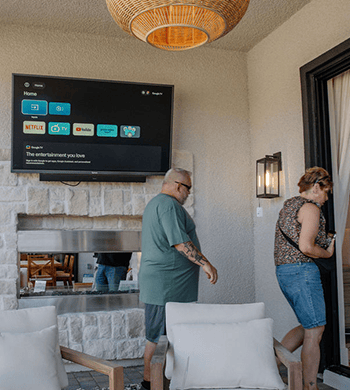

Outdoor TVs


Kitchen TVs
RV TVs
Bathroom TVs
Commercial TVs


Which Product is right for me? Fully shaded outdoor environment


For a fully shaded outdoor location, we recommend our Partial Sun TV. Here’s a quick overview:
• Deck Pro 2.0 – Excellent balance of performance and durability with 1000‑nit brightness and Google TV system. Ideal for partial sun or shaded outdoor areas.
• Deck Pro QLED 2.0 – Upgraded QLED display for richer colors and contrast, perfect if you want a more vivid picture outdoors.
• Gaming Series (120 Hz) – If you plan on gaming or sports viewing, this is optimized for smooth motion.
Does the TV supported downloading popular streaming apps?
The following is the compatibility of common streaming apps:
Supported apps for download:
Apple TV (supporteded on ATV system)
Sling TV
Yes Network App(ATVsupported)
DIRECTV(only forGoogle TV system,Android TVto be determined)
Fubo TV
ESPN
Hulu
Peacock
DIRECTV App(installable on Google TV)
Not supported apps:
Verizon Fios TV Home App(cannot be downloaded)
Xfinity Stream App(requires an external box for use)
Spectrum TV App(Not supporteded)
KnightTime+(Not supporteded)
Some apps may incompatible.
For more apps supported,consider external Fire TV Stick, Roku, or Android TV Box, and other devices to expand functionality.
How can I cast or mirror my phone to the TV?
1. Ensure the mobile phone and TV are on the same WiFi for screen mirroring.
2. Download a screen-playing app on the TV. Search for "Airplay demo" in the TV's app store and download it.
3. From the iPhone Control Center (swipe down from the top right corner of the screen), tap "Screen Mirroring" and select the corresponding TV name.
4. Disconnect: Tap "Screen Mirroring" again in the iPhone Control Center → select "Stop Mirroring".
* TVs that support iOS screen mirroring: All smart TVs except DECK/POOL.
Can I leave this tv in the cold winter?
Yes! Our Outdoor TV is designed to handle a wide range of temperatures, from -22° to 122°F (-30° to 50°C), so it should be fine in the typical winter conditions.
However, if you live in an area with heavy snow, ice, or prolonged sub-freezing temperatures, it's wise to bring the TV indoors to protect it from potential damage.
Do your outdoor TVs come with a leg?
Our outdoor TVs do not come with regular legs for table placement. This is because the units are quite heavy and designed for fixed installations—using traditional legs may pose a tipping risk and is not recommended for safety reasons.
Instead, we highly recommend using either a wall mount or ceiling mount for a secure and stable setup.
How do I clean the TV screen?
Here are the recommended steps to safely clean the screen of your Sylvox Full Sun Outdoor TV:
1.Turn off the TV and unplug it. Allow the screen to cool completely.
2. Gently wipe the screen using a dry microfiber cloth to remove dust and loose particles.
3. Do not spray alcohol directly onto the screen.
4. Wipe the screen gently in circular motions with minimal pressure.
5. Dry the screen immediately with a clean, dry section of the cloth to prevent streaks.
⚠ Please avoid:
1. Using paper towels, rough cloths, or abrasive pads
2. Cleaners that contain alcohol, ammonia, or strong chemicals (like Windex)
Can I use my outdoor tv mount for your tv?
Yes, as long as the VESA pattern matches our TV, you can use other compatible outdoor TV mounts as well.
What is the difference between the 43" Outdoor TV(Google TV) - 2024 Deck Pro 2.0 and the 43” advanced QLED outdoor tv?
The main difference between the 43" Outdoor TV (Google TV) - 2024 Deck Pro 2.0 and the 43” Advanced QLED Outdoor TV is the picture quality.
The QLED Outdoor TV offers clearer, more vibrant colors, better contrast, wider viewing angles, and improved long-term performance.
Does the TV supported downloading popular streaming apps?
The following is the compatibility of common streaming apps:
Supported apps for download:
Apple TV (supporteded on ATV system)
Sling TV
Yes Network App(ATVsupported)
DIRECTV(only forGoogle TV system,Android TVto be determined)
Fubo TV
ESPN
Hulu
Peacock
DIRECTV App(installable on Google TV)
Not supported apps:
Verizon Fios TV Home App(cannot be downloaded)
Xfinity Stream App(requires an external box for use)
Spectrum TV App(Not supporteded)
KnightTime+(Not supporteded)
Some apps may incompatible.
For more apps supported,consider external Fire TV Stick, Roku, or Android TV Box, and other devices to expand functionality.
How can I cast or mirror my phone to the TV?
1. Ensure the mobile phone and TV are on the same WiFi for screen mirroring.
2. Download a screen-playing app on the TV. Search for "Airplay demo" in the TV's app store and download it.
3. From the iPhone Control Center (swipe down from the top right corner of the screen), tap "Screen Mirroring" and select the corresponding TV name.
4. Disconnect: Tap "Screen Mirroring" again in the iPhone Control Center → select "Stop Mirroring".
* TVs that support iOS screen mirroring: All smart TVs except DECK/POOL.
Can I leave this tv in the cold winter?
Yes! Our Outdoor TV is designed to handle a wide range of temperatures, from -22° to 122°F (-30° to 50°C), so it should be fine in the typical winter conditions.
However, if you live in an area with heavy snow, ice, or prolonged sub-freezing temperatures, it's wise to bring the TV indoors to protect it from potential damage.
Do your outdoor TVs come with a leg?
Our outdoor TVs do not come with regular legs for table placement. This is because the units are quite heavy and designed for fixed installations—using traditional legs may pose a tipping risk and is not recommended for safety reasons.
Instead, we highly recommend using either a wall mount or ceiling mount for a secure and stable setup.
How do I clean the TV screen?
Here are the recommended steps to safely clean the screen of your Sylvox Full Sun Outdoor TV:
1.Turn off the TV and unplug it. Allow the screen to cool completely.
2. Gently wipe the screen using a dry microfiber cloth to remove dust and loose particles.
3. Do not spray alcohol directly onto the screen.
4. Wipe the screen gently in circular motions with minimal pressure.
5. Dry the screen immediately with a clean, dry section of the cloth to prevent streaks.
⚠ Please avoid:
1. Using paper towels, rough cloths, or abrasive pads
2. Cleaners that contain alcohol, ammonia, or strong chemicals (like Windex)
Can I use my outdoor tv mount for your tv?
Yes, as long as the VESA pattern matches our TV, you can use other compatible outdoor TV mounts as well.
Can the soundbar be installed on this TV?
The soundbar cannot be mounted directly under the Gaming model TV, and it is also not compatible with the Cinema and Cinema Pro series for under-TV installation. In these cases, the soundbar will need to be installed in a separate location.
For all other Outdoor TV models, the soundbar can be mounted underneath without any issues.
Does the TV supported downloading popular streaming apps?
The following is the compatibility of common streaming apps:
Supported apps for download:
Apple TV (supporteded on ATV system)
Sling TV
Yes Network App(ATVsupported)
DIRECTV(only forGoogle TV system,Android TVto be determined)
Fubo TV
ESPN
Hulu
Peacock
DIRECTV App(installable on Google TV)
Not supported apps:
Verizon Fios TV Home App(cannot be downloaded)
Xfinity Stream App(requires an external box for use)
Spectrum TV App(Not supporteded)
KnightTime+(Not supporteded)
Some apps may incompatible.
For more apps supported,consider external Fire TV Stick, Roku, or Android TV Box, and other devices to expand functionality.
How can I cast or mirror my phone to the TV?
1. Ensure the mobile phone and TV are on the same WiFi for screen mirroring.
2. Download a screen-playing app on the TV. Search for "Airplay demo" in the TV's app store and download it.
3. From the iPhone Control Center (swipe down from the top right corner of the screen), tap "Screen Mirroring" and select the corresponding TV name.
4. Disconnect: Tap "Screen Mirroring" again in the iPhone Control Center → select "Stop Mirroring".
* TVs that support iOS screen mirroring: All smart TVs except DECK/POOL.
Can I leave this tv in the cold winter?
Yes! Our Outdoor TV is designed to handle a wide range of temperatures, from -22° to 122°F (-30° to 50°C), so it should be fine in the typical winter conditions.
However, if you live in an area with heavy snow, ice, or prolonged sub-freezing temperatures, it's wise to bring the TV indoors to protect it from potential damage.
Do your outdoor TVs come with a leg?
Our outdoor TVs do not come with regular legs for table placement. This is because the units are quite heavy and designed for fixed installations—using traditional legs may pose a tipping risk and is not recommended for safety reasons.
Instead, we highly recommend using either a wall mount or ceiling mount for a secure and stable setup.
How do I clean the TV screen?
Here are the recommended steps to safely clean the screen of your Sylvox Full Sun Outdoor TV:
1.Turn off the TV and unplug it. Allow the screen to cool completely.
2. Gently wipe the screen using a dry microfiber cloth to remove dust and loose particles.
3. Do not spray alcohol directly onto the screen.
4. Wipe the screen gently in circular motions with minimal pressure.
5. Dry the screen immediately with a clean, dry section of the cloth to prevent streaks.
⚠ Please avoid:
1. Using paper towels, rough cloths, or abrasive pads
2. Cleaners that contain alcohol, ammonia, or strong chemicals (like Windex)
Can I use my outdoor tv mount for your tv?
Yes, as long as the VESA pattern matches our TV, you can use other compatible outdoor TV mounts as well.
Which Product is right for me? Direct sun outdoor environment
For a direct sun outdoor location, we recommend our Full Sun TV. Here’s a quick overview:
• Pool Pro 2.0 (2,000 nits) – bright enough for full sun, budget-friendly.
• Pool Pro 2.0 QLED – improved picture quality if you want sharper visuals.
• 2025 Cinema Helio QLED – our newest model, 120Hz refresh rate, 2×30W audio, excellent for full sun and smooth motion for sports and movies.
• 2025 Cinema Pro Helio QLED (120Hz, 3,500 nits) – top-of-the-line brightness and motion performance, ideal for full sun and ultimate outdoor viewing.
Does the TV supported downloading popular streaming apps?
The following is the compatibility of common streaming apps:
Supported apps for download:
Apple TV (supporteded on ATV system)
Sling TV
Yes Network App(ATVsupported)
DIRECTV(only forGoogle TV system,Android TVto be determined)
Fubo TV
ESPN
Hulu
Peacock
DIRECTV App(installable on Google TV)
Not supported apps:
Verizon Fios TV Home App(cannot be downloaded)
Xfinity Stream App(requires an external box for use)
Spectrum TV App(Not supporteded)
KnightTime+(Not supporteded)
Some apps may incompatible.
For more apps supported,consider external Fire TV Stick, Roku, or Android TV Box, and other devices to expand functionality.
How can I cast or mirror my phone to the TV?
1. Ensure the mobile phone and TV are on the same WiFi for screen mirroring.
2. Download a screen-playing app on the TV. Search for "Airplay demo" in the TV's app store and download it.
3. From the iPhone Control Center (swipe down from the top right corner of the screen), tap "Screen Mirroring" and select the corresponding TV name.
4. Disconnect: Tap "Screen Mirroring" again in the iPhone Control Center → select "Stop Mirroring".
* TVs that support iOS screen mirroring: All smart TVs except DECK/POOL.
Can I leave this tv in the cold winter?
Yes! Our Outdoor TV is designed to handle a wide range of temperatures, from -22° to 122°F (-30° to 50°C), so it should be fine in the typical winter conditions.
However, if you live in an area with heavy snow, ice, or prolonged sub-freezing temperatures, it's wise to bring the TV indoors to protect it from potential damage.
Do your outdoor TVs come with a leg?
Our outdoor TVs do not come with regular legs for table placement. This is because the units are quite heavy and designed for fixed installations—using traditional legs may pose a tipping risk and is not recommended for safety reasons.
Instead, we highly recommend using either a wall mount or ceiling mount for a secure and stable setup.
How do I clean the TV screen?
Here are the recommended steps to safely clean the screen of your Sylvox Full Sun Outdoor TV:
1.Turn off the TV and unplug it. Allow the screen to cool completely.
2. Gently wipe the screen using a dry microfiber cloth to remove dust and loose particles.
3. Do not spray alcohol directly onto the screen.
4. Wipe the screen gently in circular motions with minimal pressure.
5. Dry the screen immediately with a clean, dry section of the cloth to prevent streaks.
⚠ Please avoid:
1. Using paper towels, rough cloths, or abrasive pads
2. Cleaners that contain alcohol, ammonia, or strong chemicals (like Windex)
Can I use my outdoor tv mount for your tv?
Yes, as long as the VESA pattern matches our TV, you can use other compatible outdoor TV mounts as well.
Which Product is right for me? Direct sun outdoor environment
For a direct sun outdoor location, we recommend our Full Sun TV. Here’s a quick overview:
• Pool Pro 2.0 (2,000 nits) – bright enough for full sun, budget-friendly.
• Pool Pro 2.0 QLED – improved picture quality if you want sharper visuals.
• 2025 Cinema Helio QLED – our newest model, 120Hz refresh rate, 2×30W audio, excellent for full sun and smooth motion for sports and movies.
• 2025 Cinema Pro Helio QLED (120Hz, 3,500 nits) – top-of-the-line brightness and motion performance, ideal for full sun and ultimate outdoor viewing.
Does the TV supported downloading popular streaming apps?
The following is the compatibility of common streaming apps:
Supported apps for download:
Apple TV (supporteded on ATV system)
Sling TV
Yes Network App(ATVsupported)
DIRECTV(only forGoogle TV system,Android TVto be determined)
Fubo TV
ESPN
Hulu
Peacock
DIRECTV App(installable on Google TV)
Not supported apps:
Verizon Fios TV Home App(cannot be downloaded)
Xfinity Stream App(requires an external box for use)
Spectrum TV App(Not supporteded)
KnightTime+(Not supporteded)
Some apps may incompatible.
For more apps supported,consider external Fire TV Stick, Roku, or Android TV Box, and other devices to expand functionality.
How can I cast or mirror my phone to the TV?
1. Ensure the mobile phone and TV are on the same WiFi for screen mirroring.
2. Download a screen-playing app on the TV. Search for "Airplay demo" in the TV's app store and download it.
3. From the iPhone Control Center (swipe down from the top right corner of the screen), tap "Screen Mirroring" and select the corresponding TV name.
4. Disconnect: Tap "Screen Mirroring" again in the iPhone Control Center → select "Stop Mirroring".
* TVs that support iOS screen mirroring: All smart TVs except DECK/POOL.
Can I leave this tv in the cold winter?
Yes! Our Outdoor TV is designed to handle a wide range of temperatures, from -22° to 122°F (-30° to 50°C), so it should be fine in the typical winter conditions.
However, if you live in an area with heavy snow, ice, or prolonged sub-freezing temperatures, it's wise to bring the TV indoors to protect it from potential damage.
Do your outdoor TVs come with a leg?
Our outdoor TVs do not come with regular legs for table placement. This is because the units are quite heavy and designed for fixed installations—using traditional legs may pose a tipping risk and is not recommended for safety reasons.
Instead, we highly recommend using either a wall mount or ceiling mount for a secure and stable setup.
How do I clean the TV screen?
Here are the recommended steps to safely clean the screen of your Sylvox Full Sun Outdoor TV:
1.Turn off the TV and unplug it. Allow the screen to cool completely.
2. Gently wipe the screen using a dry microfiber cloth to remove dust and loose particles.
3. Do not spray alcohol directly onto the screen.
4. Wipe the screen gently in circular motions with minimal pressure.
5. Dry the screen immediately with a clean, dry section of the cloth to prevent streaks.
⚠ Please avoid:
1. Using paper towels, rough cloths, or abrasive pads
2. Cleaners that contain alcohol, ammonia, or strong chemicals (like Windex)
Can I use my outdoor tv mount for your tv?
Yes, as long as the VESA pattern matches our TV, you can use other compatible outdoor TV mounts as well.
Which Product is right for me? Direct sun outdoor environment
For a direct sun outdoor location, we recommend our Full Sun TV. Here’s a quick overview:
• Pool Pro 2.0 (2,000 nits) – bright enough for full sun, budget-friendly.
• Pool Pro 2.0 QLED – improved picture quality if you want sharper visuals.
• 2025 Cinema Helio QLED – our newest model, 120Hz refresh rate, 2×30W audio, excellent for full sun and smooth motion for sports and movies.
• 2025 Cinema Pro Helio QLED (120Hz, 3,500 nits) – top-of-the-line brightness and motion performance, ideal for full sun and ultimate outdoor viewing.
Does the TV supported downloading popular streaming apps?
The following is the compatibility of common streaming apps:
Supported apps for download:
Apple TV (supporteded on ATV system)
Sling TV
Yes Network App(ATVsupported)
DIRECTV(only forGoogle TV system,Android TVto be determined)
Fubo TV
ESPN
Hulu
Peacock
DIRECTV App(installable on Google TV)
Not supported apps:
Verizon Fios TV Home App(cannot be downloaded)
Xfinity Stream App(requires an external box for use)
Spectrum TV App(Not supporteded)
KnightTime+(Not supporteded)
Some apps may incompatible.
For more apps supported,consider external Fire TV Stick, Roku, or Android TV Box, and other devices to expand functionality.
How can I cast or mirror my phone to the TV?
1. Ensure the mobile phone and TV are on the same WiFi for screen mirroring.
2. Download a screen-playing app on the TV. Search for "Airplay demo" in the TV's app store and download it.
3. From the iPhone Control Center (swipe down from the top right corner of the screen), tap "Screen Mirroring" and select the corresponding TV name.
4. Disconnect: Tap "Screen Mirroring" again in the iPhone Control Center → select "Stop Mirroring".
* TVs that support iOS screen mirroring: All smart TVs except DECK/POOL.
Can I leave this tv in the cold winter?
Yes! Our Outdoor TV is designed to handle a wide range of temperatures, from -22° to 122°F (-30° to 50°C), so it should be fine in the typical winter conditions.
However, if you live in an area with heavy snow, ice, or prolonged sub-freezing temperatures, it's wise to bring the TV indoors to protect it from potential damage.
Do your outdoor TVs come with a leg?
Our outdoor TVs do not come with regular legs for table placement. This is because the units are quite heavy and designed for fixed installations—using traditional legs may pose a tipping risk and is not recommended for safety reasons.
Instead, we highly recommend using either a wall mount or ceiling mount for a secure and stable setup.
How do I clean the TV screen?
Here are the recommended steps to safely clean the screen of your Sylvox Full Sun Outdoor TV:
1.Turn off the TV and unplug it. Allow the screen to cool completely.
2. Gently wipe the screen using a dry microfiber cloth to remove dust and loose particles.
3. Do not spray alcohol directly onto the screen.
4. Wipe the screen gently in circular motions with minimal pressure.
5. Dry the screen immediately with a clean, dry section of the cloth to prevent streaks.
⚠ Please avoid:
1. Using paper towels, rough cloths, or abrasive pads
2. Cleaners that contain alcohol, ammonia, or strong chemicals (like Windex)
Can I use my outdoor tv mount for your tv?
Yes, as long as the VESA pattern matches our TV, you can use other compatible outdoor TV mounts as well.
Which Product is right for me? Direct sun outdoor environment
For a direct sun outdoor location, we recommend our Full Sun TV. Here’s a quick overview:
• Pool Pro 2.0 (2,000 nits) – bright enough for full sun, budget-friendly.
• Pool Pro 2.0 QLED – improved picture quality if you want sharper visuals.
• 2025 Cinema Helio QLED – our newest model, 120Hz refresh rate, 2×30W audio, excellent for full sun and smooth motion for sports and movies.
• 2025 Cinema Pro Helio QLED (120Hz, 3,500 nits) – top-of-the-line brightness and motion performance, ideal for full sun and ultimate outdoor viewing.
Does the TV supported downloading popular streaming apps?
The following is the compatibility of common streaming apps:
Supported apps for download:
Apple TV (supporteded on ATV system)
Sling TV
Yes Network App(ATVsupported)
DIRECTV(only forGoogle TV system,Android TVto be determined)
Fubo TV
ESPN
Hulu
Peacock
DIRECTV App(installable on Google TV)
Not supported apps:
Verizon Fios TV Home App(cannot be downloaded)
Xfinity Stream App(requires an external box for use)
Spectrum TV App(Not supporteded)
KnightTime+(Not supporteded)
Some apps may incompatible.
For more apps supported,consider external Fire TV Stick, Roku, or Android TV Box, and other devices to expand functionality.
How can I cast or mirror my phone to the TV?
1. Ensure the mobile phone and TV are on the same WiFi for screen mirroring.
2. Download a screen-playing app on the TV. Search for "Airplay demo" in the TV's app store and download it.
3. From the iPhone Control Center (swipe down from the top right corner of the screen), tap "Screen Mirroring" and select the corresponding TV name.
4. Disconnect: Tap "Screen Mirroring" again in the iPhone Control Center → select "Stop Mirroring".
* TVs that support iOS screen mirroring: All smart TVs except DECK/POOL.
Can I leave this tv in the cold winter?
Yes! Our Outdoor TV is designed to handle a wide range of temperatures, from -22° to 122°F (-30° to 50°C), so it should be fine in the typical winter conditions.
However, if you live in an area with heavy snow, ice, or prolonged sub-freezing temperatures, it's wise to bring the TV indoors to protect it from potential damage.
Do your outdoor TVs come with a leg?
Our outdoor TVs do not come with regular legs for table placement. This is because the units are quite heavy and designed for fixed installations—using traditional legs may pose a tipping risk and is not recommended for safety reasons.
Instead, we highly recommend using either a wall mount or ceiling mount for a secure and stable setup.
How do I clean the TV screen?
Here are the recommended steps to safely clean the screen of your Sylvox Full Sun Outdoor TV:
1.Turn off the TV and unplug it. Allow the screen to cool completely.
2. Gently wipe the screen using a dry microfiber cloth to remove dust and loose particles.
3. Do not spray alcohol directly onto the screen.
4. Wipe the screen gently in circular motions with minimal pressure.
5. Dry the screen immediately with a clean, dry section of the cloth to prevent streaks.
⚠ Please avoid:
1. Using paper towels, rough cloths, or abrasive pads
2. Cleaners that contain alcohol, ammonia, or strong chemicals (like Windex)
Can I use my outdoor tv mount for your tv?
Yes, as long as the VESA pattern matches our TV, you can use other compatible outdoor TV mounts as well.
What is the difference of the 15.6 under counter tv and Mini Model
15.6" Smart Under Cabinet TV for Kitchen runs on the Android system, has a wider swivel angle, and includes a timer/alarm function.
15.6" Under Cabinet Kitchen TV-Mini Kitchen Series uses the Google system, offers better sound quality, but the swivel angle is smaller and it doesn’t include a timer.
How can I cast or mirror my phone to the TV?
1. Ensure that the mobile phone and the TV are on the same WiFi for screen mirroring.
2. Download a screen-playing app on the TV. Search for "Airplay demo/Airplay Mirror(Demo)" in the TV's app store and download it.
3. From the iPhone Control Center (swipe down from the top right corner of the screen), tap "Screen Mirroring" and select the corresponding TV name.
4. Disconnect: Tap "Screen Mirroring" again in the iPhone Control Center → select "Stop Mirroring".
5. Small TVs that support iOS screen mirroring: All smart RV TVs; bathroom TVs; kitchen TVs; portable TVs.
Does the 15.6 kitchen TV have HDMI arc
Yes! Our kitchen TVs are equipped with an HDMI ARC port.
What color is the tv frame and stand?
Our Limo RV TV features a frameless design with a metal stand, giving it a sleek and modern look.
Does it come with a dvd player?
Yes, our Limo RV TV does include a built-in DVD player.
Does the DVD work with blue ray DVDs and standard?
The built-in DVD player supports the following formats:
DVD / CD / CDR / CDRW / DVD-R / DVD+R / DVD-RW / DVD+RW / VCD / SVCD.
Please note that Blu-ray discs are not supported.
Can it be used in my house and plugged into a regular plug in the wall? What cables does it use to connect to satellite system box?
Yes, it can be used in your home and plugged into a regular wall outlet.
Will it work with an external box?
Yes, it will work with a DirecTV satellite box via HDMI.
Does the DVD work with blue ray DVDs and standard?
The built-in DVD player supports the following formats:
DVD / CD / CDR / CDRW / DVD-R / DVD+R / DVD-RW / DVD+RW / VCD / SVCD.
Please note that Blu-ray discs are not supported.
Can it be used in my house and plugged into a regular plug in the wall? What cables does it use to connect to satellite system box?
Yes, it can be used in your home and plugged into a regular wall outlet.
Will it work with an external box?
Yes, it will work with a DirecTV satellite box via HDMI.
Does it come with a dvd player?
No, our Vehicle RV TV does not include a built-in DVD player.
Does it support USB power supply?
USB power supply is not supported. USB only provides 5V, which is insufficient to drive the TV.
Do your marine series tvs have HDMI ports?
Yes, the Sylvox Marine TV series includes HDMI ports, allowing you to connect devices like a cable box or streaming device.
Does it come with a dvd player?
22'' Marine RV TV does include a built-in DVD player. Please note that the 40" model does not include a DVD player.
Does it need to be connected to a power outlet?
Our TV requires connection to a power outlet via its power cord in order to operate.
How to install this TV?
Here is a step-by-step installation video tutorial, which you can view here:
🎥 https://www.youtube.com/watch?v=77_dx5SZkDM
(If the link doesn't open directly, feel free to copy and paste it into your browser.)
Does it need to be connected to a power outlet?
Our TV requires connection to a power outlet via its power cord in order to operate.
How to install this TV?
Here is a step-by-step installation video tutorial, which you can view here:
🎥 https://www.youtube.com/watch?v=4j5jsQoFO9w
(If the link doesn't open directly, feel free to copy and paste it into your browser.)
Is there any USB options
Yes, the TV includes a USB port for additional content uploads.
I am looking at a tv for outdoor menu on my coffee shop.I need it to be vertical. Can I turn it?
This TV is specifically designed for commercial use and perfectly meets your menu needs. It also fully supports portrait mode.
This TV features a remote control system, allowing you to adjust content playback on multiple devices simultaneously. There's no limit to the number of connected devices, and there's no charge.
For a video on how to use the remote control system, you can click this link: https://www.youtube.com/watch?v=XG0_DusNufE&list=TLGGZwRvvOAXqssxMTA2MjAyNQ.
Can this TV automatically adjust its brightness based on ambient light?
Our Outdoor Digital Signage TV (2025 Model) — does not support automatic brightness adjustment based on ambient light.
However, you can manually adjust the brightness through the TV's settings menu. Please refer to the user manual for detailed steps.
Does it come with a wall mount for outside?
The Outdoor Digital Signage - 2025 Model does not come with a wall mount included. However, we offer a compatible Outdoor TV Wall Mount that is suitable for this model.
You can view and purchase the wall mount here:
https://sylvoxtv.com/products/outdoor-tv-mount
Is there any USB options
Yes, the TV includes a USB port for additional content uploads.
I am looking at a tv for outdoor menu on my coffee shop.I need it to be vertical. Can I turn it?
This TV is specifically designed for commercial use and perfectly meets your menu needs. It also fully supports portrait mode.
This TV features a remote control system, allowing you to adjust content playback on multiple devices simultaneously. There's no limit to the number of connected devices, and there's no charge.
For a video on how to use the remote control system, you can click this link: https://www.youtube.com/watch?v=XG0_DusNufE&list=TLGGZwRvvOAXqssxMTA2MjAyNQ.
Can this TV automatically adjust its brightness based on ambient light?
Our Outdoor Digital Signage TV (2025 Model) — does not support automatic brightness adjustment based on ambient light.
However, you can manually adjust the brightness through the TV's settings menu. Please refer to the user manual for detailed steps.
Does it come with a wall mount for outside?
The Outdoor Digital Signage - 2025 Model does not come with a wall mount included. However, we offer a compatible Outdoor TV Wall Mount that is suitable for this model.
You can view and purchase the wall mount here:
https://sylvoxtv.com/products/outdoor-tv-mount


