


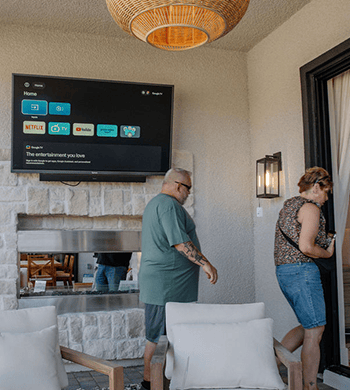

Before mounting an outdoor TV on a patio wall or covered deck, separate the surface you can see from the structure that will carry the mount. Then match the selected television's weight, mounting-hole pattern, mount movement, and rear clearance to that specific installation. A brick face, stone veneer, stucco finish, or wood cladding does not by itself indicate what lies behind it. When installing a Sylvox outdoor TV, move on to drilling only after you have checked the wall structure, TV specifications, and mount requirements as a complete setup.
The visible finish is only the starting point
“Brick wall” can describe solid masonry, a veneer, or a finish over another structure. “Stone” can mean a solid section, a thin facing, or a mixed assembly. Stucco may cover different backing systems, while wood siding or a decorative wood panel may not be the part that carries the load. The finish is visible; it does not identify the load-bearing substrate. Note what you can verify from the site and what still needs an on-site assessment. Photograph the wall from several angles, note openings and edges, and identify whether the proposed position is near a corner, post, beam, window, or cabinet. If the wall assembly is uncertain, stop short of choosing fasteners from a generic chart. A qualified installer can assess the actual structure and the condition of the materials at the proposed mounting points. Even a uniform-looking wall can vary beside a door, corner, or repair. The plan needs the structure behind the finish, not only a label for the front surface.
Check that the TV and mount fit together
Collect the inputs for the exact television and the exact mount before choosing a position. The useful set includes the TV's overall width, height, depth, weight, mounting-hole pattern, installation orientation, and the clearances in the current manual. For the mount, record its supported weight range, screen-size range, movement, extension, locking features, and instructions for the intended surface. VESA spacing is one compatibility input, not a complete structural decision. A matching hole pattern does not remove the need to assess the mount's capacity, the wall assembly, fastener method, cable access, and the movement allowed after installation. For a Sylvox outdoor TV, use the exact model and its current documentation throughout the comparison.Use one current set of specifications for the selected model and size when checking compatibility.
Account for fixed, tilt, and full-motion mounts
Mount movement changes the space around the television. A fixed mount may keep the housing close to the wall, while a tilt mount changes the top and bottom clearance. A full-motion mount may extend or swivel, depending on the model, so the route, nearby objects, and supporting structure must be checked through the complete permitted movement. Ask four separate questions:
- Where is the television's center when the mount is in its normal viewing position?
- What is the farthest extension or side movement allowed by the mount?
- Does that movement bring the housing, arm, or cable toward a door, post, roof edge, or walking route?
- Can the connections still be reached without forcing the screen or pulling a cable?
Do not choose full motion simply because it offers more adjustment. It may be useful for seating in more than one direction, but the movement range becomes another part of the installation to assess. A tilt mount may simplify the layout in a single viewing direction, but it still requires the TV, mount, and wall to be compatible.
Check what sits behind each wall finish
Use the table to organize the questions for your installer; it points to the information to confirm before choosing a mounting or fastening method.
| Visible surface | Verify with the installer | Do not assume |
|---|---|---|
Brick | Whether the brick is structural, a veneer, or part of a different assembly; its condition at the proposed points | That every visible brick face accepts the same fixing method |
Stone | Whether the stone is solid, faced, jointed, or backed by another structure; the condition around the planned area | That a heavy-looking surface automatically provides a known support point |
Stucco | What backing and framing sit behind the finish; where the structural attachment can be made | That the stucco layer itself is the load-bearing element |
Wood | The actual structural members, their location, spacing, and condition; the effect of cladding or trim | That a decorative panel or any visible board is a suitable support |
Choose the mounting method after the installer has identified the structure and confirmed how the selected mount can attach there. The required fastener and drilling details depend on that site assessment.
Check clearance, ports, and future service
Measure the installed space around the housing, not only the screen face. Include doors, trim, roof members, cabinets, lights, speakers, and furniture that could interfere with the mount or with a technician's access. Check the screen position in both the normal and maximum permitted mount positions. Connection planning belongs in the same review. A cable entry that works with a fixed mount may become inaccessible when the full-motion arm is extended. For a Sylvox outdoor TV, check the model's connection locations and rear-clearance requirements, and leave a practical service path for inspection, replacement, or a future mount adjustment. When you are still choosing a screen, use the Sylvox outdoor TV collection to compare options, then confirm the wall structure, mount range, and service access before ordering hardware.If you are also planning power and cable routing, use the outdoor TV power and cable planning checklist before finalizing the mount position. After the wall and mount inputs are clear, review the outdoor TV mounting height and viewing angle separately so they do not hide a clearance or structure problem.
Prepare the installer notes
Before work begins, assemble:
| Installer note | What to include |
|---|---|
Wall record | Photos, surface description, openings, edges, visible repairs, and the proposed center |
Structure questions | What is known about the backing, and what needs an on-site assessment |
TV record | Exact model number, region, weight, dimensions, VESA pattern, orientation, and manual |
Mount record | Type, movement, extension, capacity, instructions, and locking or safety features |
Space record | Cable entry, rear access, full movement range, trim, doors, and service path |
Have the installer review the records before drilling. Bring the wall photos, TV details, and mount details to that review so any remaining questions can be resolved on site. If the structure, TV details, or mount instructions need clarification, resolve them before choosing the mounting method.
FAQ
If I replace the TV later, can I reuse the existing mount holes?
Not automatically. Before reusing the mount, recheck the replacement TV's weight, VESA pattern, orientation, mount capacity, and the condition of the existing attachment points. A different TV or position may require a new assessment.
What should I ask the installer to confirm before drilling?
Ask the installer to identify the load-bearing backing, the proposed attachment points, and the mounting method for that assembly. Have any limits on the chosen position recorded before work begins, especially if the visible finish has repairs, trim, or nearby openings.
What should I record for a full-motion mount before installation?
Record both the parked position and the farthest permitted extension or swivel. Note the doors, posts, trim, or cables closest to each position so the installer can assess the movement path before drilling. Once the wall and mount inputs are documented, use the Sylvox outdoor TV installation guide with your site notes. This keeps the surface, product, and hardware decisions aligned with the installation conditions.


Leave a comment